
Before you install
What the app is built to keep visible
HardwareVisualizer is a free, open-source desktop monitor for people who want live hardware state, short-window graphs, and recent history in one readable surface.
Official distribution
GitHub Releases, hardviz.com, and Winget where available.
Desktop coverage
Windows 10/11, macOS builds for Apple Silicon and Intel, plus Linux packages for common desktop distributions.
Historical insight
CPU, memory, GPU, and process history are kept for up to 30 days by default.
Privacy posture
No outbound telemetry for collected hardware data.
Customization
Color themes, graph colors, background images, transparent UI, glass blur, and tray widget preferences.
Languages
The app supports English, Japanese, and Russian.
Platform fit
Operating systems and installers
The app targets desktop operating systems, but sensor depth can vary by OS APIs, device files, drivers, and vendor SDKs.
Windows
Supported- Coverage
- Windows 10/11, x64
- Notes
- MSI and setup installers are available, and Winget is an official Windows installation path where available.
macOS (Apple Silicon)
Supported- Coverage
- Apple Silicon (ARM64)
- Notes
- macOS releases are signed and notarized. Sensor coverage depends on the machine and OS API availability.
macOS (Intel)
Experimental- Coverage
- Intel (x64)
- Notes
- Intel macOS builds are experimental. Sensor coverage depends on the machine and OS API availability.
Linux
Supported- Coverage
- Debian/Ubuntu, RPM-based distros, AppImage
- Notes
- Some device files and sensors may require elevated privileges. Desktop-environment limitations can apply.
Hardware coverage
Signals and feature coverage
The matrix separates always-useful dashboard surfaces from best-effort sensor paths and planned monitoring work by operating system.
CPU / RAM
CPU and RAM usage, memory details, history
Live usage, memory details, and history are core supported surfaces.
Live usage, memory details, and history are core supported surfaces.
Live usage, memory details, and history are core supported surfaces.
GPU
NVIDIA full path, AMD and Intel partial paths
Deepest coverage, especially NVIDIA; AMD and Intel depend on driver and API availability.
Partial coverage through macOS APIs; visible counters vary by device.
Partial coverage through NVIDIA and DRM paths; permissions and drivers matter.
CPU / sensor temperature
CPU package and thermal-zone temperature where available
ACPI thermal zones are best effort; PawnIO can improve CPU package temperature on supported CPUs.
Best effort. Sensor exposure depends on the machine and macOS APIs.
Best effort. Sensor access can depend on device files, drivers, and privileges.
Storage Health
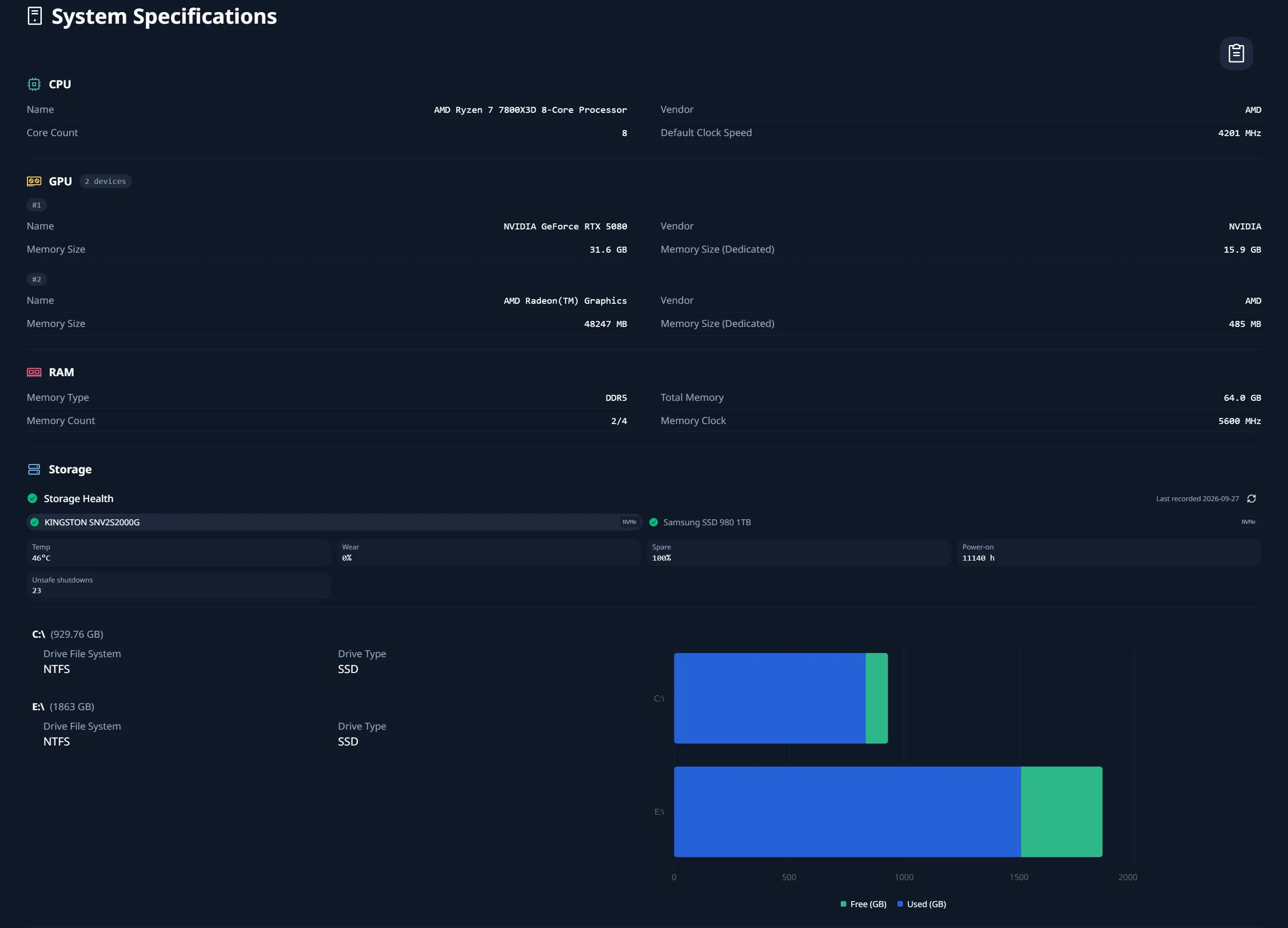
Storage summary, Storage Health records, Live Storage Health
Native and fallback paths can expose SMART or NVMe health fields when available.
Native paths can expose storage summary and selected health fields when available.
Native paths and smartctl can improve SMART or NVMe health coverage.
Network
Interface, IP, subnet, and gateway data
Interface, IP, subnet, and gateway data are available; traffic usage is planned.
Interface, IP, subnet, and gateway data are available; traffic usage is planned.
Interface, IP, subnet, and gateway data are available; traffic usage is planned.
Process
Live Process Table and Process Insight
Live Process Table and Process Insight connect current load with history.
Live Process Table and Process Insight connect current load with history.
Live Process Table and Process Insight connect current load with history.
Fan
Windows fan speed on supported Super I/O sensors
Fan-speed reads are implemented for supported Super I/O sensors through the optional PawnIO LpcIO module. Coverage varies by motherboard, and this read-only path does not support fan control.
Cross-vendor fan monitoring remains roadmap and research work.
Cross-vendor fan monitoring remains roadmap and research work.
Language
English, Japanese, Russian
English, Japanese, and Russian are supported in the app.
English, Japanese, and Russian are supported in the app.
English, Japanese, and Russian are supported in the app.
Readable on your desk
Appearance and customization
HardwareVisualizer is meant to stay open, so visual settings are part of the product surface rather than a decorative afterthought.
Color themes
System , Light , Dark , Dark+ , Sky , Grove , Sunset , Nebula , Orbit , Cappuccino , Espresso .
Theme choices cover neutral, bright, dark, and warm setups without forcing a single visual personality.
Graph colors
Per-metric line colors for CPU, memory, and GPU graphs.
Useful when the app is kept on a side display and the important metric needs to be recognizable immediately.
Background images
Local background image selection with opacity control.
Background assets stay local and can be toned down so metrics remain readable.
Transparent UI
Transparent window surfaces with adjustable glass blur.
The glass effect is configurable, and interactive controls keep opaque enough contrast for day-to-day use.
Tray widget
CPU, GPU, and GPU temperature metrics, with ordering and visibility preferences.
Close-to-tray behavior and compact metric access help the monitor stay available without occupying the full desktop.
Display preferences
Language, temperature unit, dashboard visibility, and chart display settings.
These settings make the app more useful across regions, Celsius/Fahrenheit habits, and different monitoring workflows.
Deeper hardware paths
Storage Health and optional components
Optional components are not bundled with the app. On Windows, you can choose PawnIO during MSI setup or install it later from Settings with administrator approval.
Live Storage Health
A cheap native read path refreshes focused storage information without running smartctl on the live polling cadence.
Storage Health Record
Daily health records can include SMART overall health, temperature, NVMe percentage used, available spare, reallocated sectors, pending sectors, offline uncorrectable sectors, and NVMe media errors when available.
PawnIO for CPU package temperature
On Windows, Settings → Advanced → Optional component setup can download and install PawnIO with administrator approval. Supported CPUs and motherboards may then expose package temperature, power, and sensor readings.
smartctl for richer storage signals
smartmontools can improve Storage Health when native OS paths cannot read important SMART or NVMe health fields.
Trust model
Privacy and download verification
HardwareVisualizer is open source, avoids outbound telemetry for collected hardware data, and documents how to verify official release files.
- Official sources
- Use GitHub Releases, hardviz.com, or Winget where available. Third-party mirrors and password-protected archives are not official.
- SHA-256 checksums
- SHA256SUMS.txt is published for release assets from v1.8.1 onward.
- GitHub Artifact Attestations
- Release artifacts include GitHub Artifact Attestations from v1.8.1 onward where available.
- Windows signing
- Windows installers are Authenticode signed from v1.9.0 onward.
- macOS signing
- macOS downloads are signed with Apple Developer ID and notarized.
- Linux packages
- Linux package signing is not currently provided through GPG, Sigstore, or repository metadata; use checksums and attestations instead.